A DIY LLM visibility tracker can run fixed prompts through web-enabled APIs, save answers and citations, and calculate brand mentions, citation rates and competitor visibility.
Summarize with ChatGPTClaudePerplexity
View as Markdown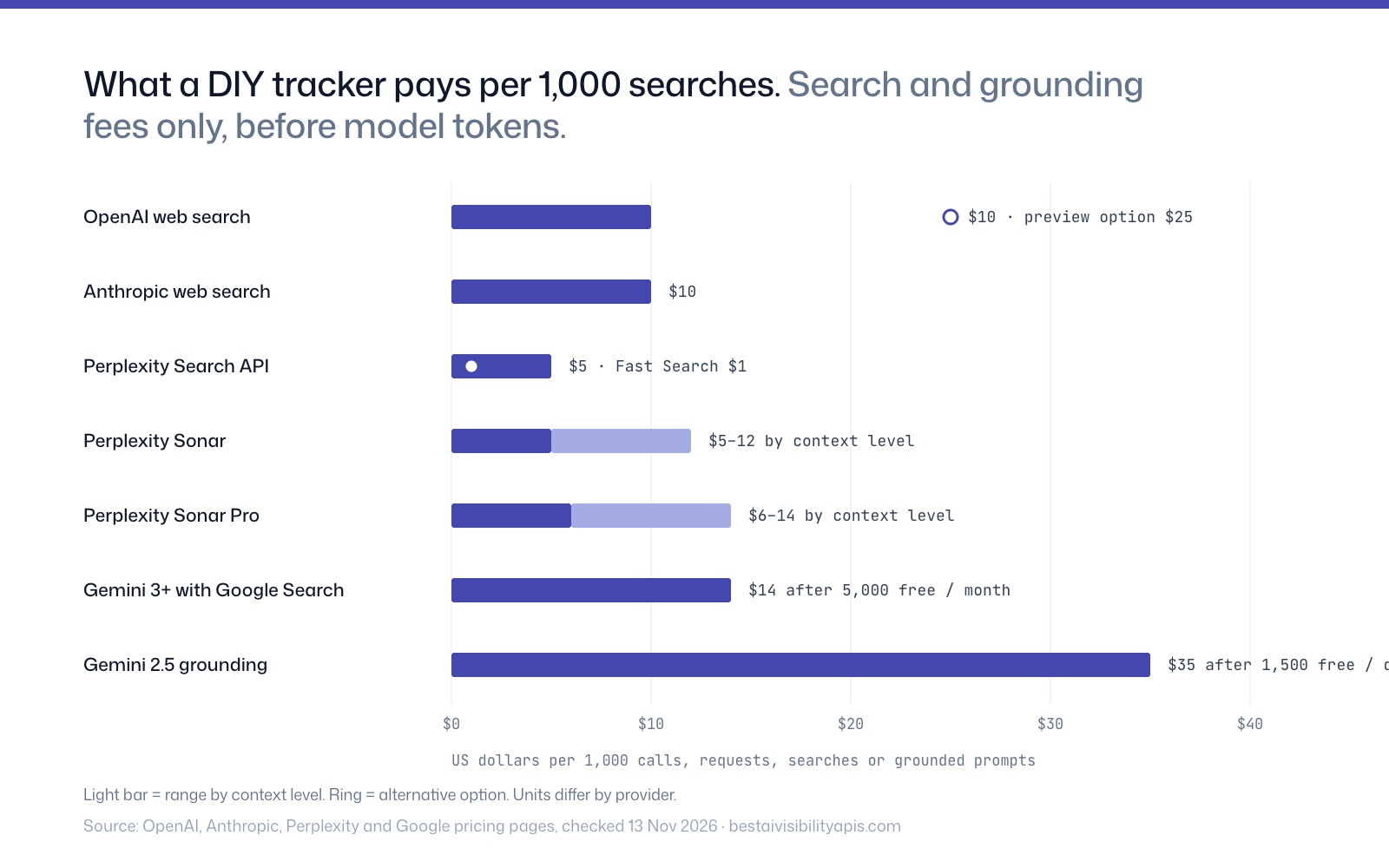
TL;DR
- A DIY LLM visibility tracker can run fixed prompts through web-enabled APIs, save answers and citations, and calculate brand mentions, citation rates and competitor visibility.[1]
- API pricing is not directly comparable because providers charge different combinations of calls, searches, context, grounding and tokens.[5]
- Gemini may bill each search query triggered by a prompt, while OpenAI, Perplexity and Anthropic use different search and token-metering models.[9]
- API results should be labeled as API-surface visibility because published research and documentation do not guarantee parity with consumer chatbot interfaces.[1]
- Repeated runs, preserved raw answers and separate API/UI datasets are essential because cited sources and brand mentions can vary across otherwise identical tests.[1]
Yes. A DIY tracker can send a fixed prompt set to web-enabled APIs, store the returned answers and citations, then calculate brand mentions, citation frequency, position, competitors and change over time. The main limitation is that API results measure visibility on a particular API surface—not necessarily what users see in a consumer ChatGPT, Perplexity or Gemini interface.[1]
A practical build needs four components:
- A prompt database containing commercial, informational and comparison queries.
- API connectors for the models and web-search tools you want to test.
- A structured store for answers, citations, timestamps, model settings and run IDs.
- An analysis layer that detects brand mentions, cited domains, competitor position and repeatability.
The engineering is manageable. The measurement design is harder because providers charge different units, web-enabled answers can vary between runs, and API and consumer interfaces expose different controls.
What does an LLM visibility tracker measure?
An LLM visibility tracker measures how often a brand appears in answers generated for a defined set of prompts. It can record whether the brand is mentioned, whether its domain is cited, where it appears in the answer, which competitors are present and which sources the model used.
A simple visibility rate is:
[ \text{Visibility rate}=\frac{\text{runs containing a brand mention or citation}}{\text{total completed runs}}\times100 ]
You can also calculate separate metrics:
- Mention rate: the percentage of runs that name the brand.
- Citation rate: the percentage of runs that cite the brand’s domain.
- First-position rate: the percentage of runs where the brand is named first.
- Share of voice: the brand’s mentions divided by all tracked brand mentions.
- Source share: the proportion of retrieved or cited sources belonging to the brand’s domain.
- Repeatability: how often repeated runs produce the same brand or source result.
These metrics are only meaningful when the prompt set, models, search settings and sampling schedule remain consistent. An API benchmark should not be presented as a universal measure of consumer-app visibility because published documentation does not provide an API-to-UI conversion factor.[1]
Which APIs can power a DIY tracker?
OpenAI web search
OpenAI’s Responses API offers web search tools and a search_context_size control with low, medium and high settings.[2][3] The published pricing lists web search at $10 per 1,000 calls for the standard and reasoning-model search options, while one preview option for other models is listed at $25 per 1,000 calls; model token charges may apply depending on the option.[4][5]
OpenAI is useful when the tracker needs generated answers, model-controlled web research and configurable search context. Store the model name, search-context setting and returned citations with every run because changing any of these can change the observed series.
Perplexity Sonar and Search API
Perplexity offers two different products that should not be treated as interchangeable. Sonar returns a generated answer with citations, whereas the raw Search API returns ranked search results as structured JSON.[6][7]
Sonar pricing combines token charges with a context-dependent request fee. Sonar is listed at $1 per million input tokens and $1 per million output tokens, with context-request fees of $5, $8 or $12 per 1,000 requests for low, medium or high context; Sonar Pro and other models use different rates.[8]
The raw Perplexity Search API is listed at $5 per 1,000 requests, or $1 per 1,000 Fast Search requests, without an additional token-based charge.[2] It is appropriate for measuring retrieved-source availability, but its results should not be merged into a metric intended to represent generated-answer visibility.[1]
Gemini with Google Search grounding
Gemini’s Google Search grounding can execute one or more searches while answering a prompt. For Gemini 3 and newer models, Google lists 5,000 free search requests per month and then $14 per 1,000 search requests.[5][9]
The important billing detail is that Google counts each search query executed by the model rather than simply counting each user prompt.[9] A single tracked prompt can therefore consume more than one billable search request. A related pattern appears on Google’s consumer surface: Finseo’s own query fan-out study found that AI Mode rewrites one prompt into about nine synthetic searches, though that describes AI Mode behavior rather than Gemini API billing.
For Gemini 2.5 Pro, Flash and Flash-Lite grounding, Google documents 1,500 free requests per day and then $35 per 1,000 grounded prompts.[5] Keep the Gemini model generation and grounding configuration in the run record so that pricing and results can be audited later.
Anthropic web search
Anthropic’s web-search tool is listed at $10 per 1,000 searches, in addition to standard token costs for search-generated content.[10] Anthropic states that search results count as input tokens, including when content is retained into later conversation turns.[10]
Anthropic can extend a cross-provider tracker, but it should be treated as a separate API series. The tracker should not assume that an answer produced through one provider’s search tool represents the answer produced by another provider or its consumer application.
How much does a DIY LLM tracker cost?
The API bill depends on prompt volume, repeat count, search depth, model choice and the number of searches triggered per prompt. The following table lists published search or grounding charges; token charges are additional where noted.
| API or product | Published search or grounding fee | Main cost caveat |
|---|---|---|
| OpenAI Responses API web search | $10 per 1,000 calls; one preview option is $25 per 1,000 calls | Search-content tokens and model tokens may be charged separately.[4] |
| Perplexity Sonar | $5–$12 per 1,000 context requests depending on context level | Input and output tokens are charged separately.[2] |
| Perplexity Sonar Pro | $6–$14 per 1,000 context requests depending on context level | Published token rates are $3 per million input tokens and $15 per million output tokens.[2] |
| Perplexity raw Search API | $5 per 1,000 requests; Fast Search is $1 per 1,000 | Returns structured search results rather than a generated Sonar answer.[7] |
| Gemini 3 and newer with Google Search | 5,000 search requests free monthly, then $14 per 1,000 | Google bills searches executed by the model, not merely user prompts.[5][1] |
| Gemini 2.5 grounding | 1,500 requests free daily, then $35 per 1,000 grounded prompts | Google documents this older pricing unit as prompts rather than individual searches.[5] |
| Anthropic web search | $10 per 1,000 searches | Search-generated content also incurs standard token costs.[10] |
A useful planning formula is:
[ \text{Monthly search cost} \approx \text{prompts}\times\text{runs}\times\text{providers}\times\text{average searches per run}\times\text{search price} ]
This is only an estimate. Gemini can bill multiple searches for one prompt, while other providers combine search fees with token charges or context fees.[11][1]
For example, a tracker with 100 prompts, 10 repeated runs and three providers produces 3,000 provider-runs before accounting for retries or multiple searches. If each provider-run triggers one billable search at $10 per 1,000 searches, the search component alone would be about $30. Actual totals can be higher when token, context, reasoning or multiple-search charges apply.[2]
Budget separately for:
- API search and model charges.
- Database storage for answer text and citations.
- Queueing, retries and rate-limit handling.
- Scheduled execution and monitoring.
- Embeddings or a classifier for brand detection.
- Human review of ambiguous mentions.
- Data retention and export.
The largest hidden cost is often not the first API call. It is repeated measurement: visibility tracking requires enough runs to distinguish a persistent pattern from a single stochastic answer.[1]
How do you build a basic tracker?
1. Define the measurement contract
Write down exactly what counts as a visibility event before collecting data. Decide whether a brand mention must be an exact match, whether product names count, how subsidiaries are handled and whether a citation counts only when it points to the brand’s own domain.
Also define the comparison set. A tracker that looks only for one brand cannot calculate reliable share of voice or competitor position.
2. Create a stable prompt set
Store each prompt with a unique ID, market, language, funnel stage, topic and intended competitor category. Avoid changing wording during a measurement period unless the change is recorded as a new prompt version.
Include prompts such as:
- “What are the best tools for [category]?”
- “Compare [brand] with [competitor].”
- “Which providers are suitable for [use case]?”
- “What should a buyer consider before choosing [category]?”
- “Which brands offer [specific product or service]?”
Do not interpret a single prompt as market share. A prompt set should cover the questions a defined audience might ask, and its scope should be reported alongside the results.
3. Normalize provider requests
Create one internal request format and map it to each provider:
from dataclasses import dataclass
from datetime import datetime, timezone

@dataclass
class VisibilityRun:
    prompt_id: str
    provider: str
    model: str
    answer: str
    citations: list[str]
    ran_at: str
    search_setting: str | None = None

def make_run(prompt_id, provider, model, answer, citations,
             search_setting=None):
    return VisibilityRun(
        prompt_id=prompt_id,
        provider=provider,
        model=model,
        answer=answer,
        citations=citations,
        ran_at=datetime.now(timezone.utc).isoformat(),
        search_setting=search_setting,
    )
The provider adapter should return the answer, citations, model, search configuration, request ID and usage information. Never store only the final visibility score; retain the underlying answer so that classifications can be reviewed.
4. Extract mentions and citations
Use deterministic rules first:
- Normalize capitalization and punctuation.
- Match official brand names, product names and known variants.
- Normalize cited URLs to registrable domains.
- Record the first character or sentence position of each mention.
- Separate answer-text mentions from cited-domain matches.
Then send ambiguous cases to a classifier or manual review queue. A brand can be discussed without being cited, and a domain can be cited without the brand being named in the prose.
5. Repeat runs and preserve conditions
Run each prompt multiple times under the same provider, model and search settings. Save the timestamp, API version where available, temperature or equivalent controls, search setting and response metadata.
AI-search results can vary even when identical prompts are run simultaneously. One study tested repeated prompts across four engines and found substantial variation in cited sources and brand mentions.[1] A single run is therefore a snapshot, not a dependable visibility baseline.
6. Calculate and publish uncertainty
Report the number of prompts and runs behind every percentage. For a 20-run series, “the brand appeared in 11 runs” is more informative than “55% visibility” without a denominator.
Compare rolling periods rather than overreacting to one result. Flag large changes for review when the provider changed its model, search behavior, response format or billing configuration.
7. Separate API series from consumer-app series
Keep OpenAI API, ChatGPT consumer, Perplexity Sonar, Perplexity consumer and Gemini API results in separate datasets unless a validated methodology supports combining them. API evaluations have been shown to differ from corresponding chatbot-interface evaluations, including in accuracy and test-retest agreement.[12]
What should the database store?
A minimum schema should include:
| Field | Purpose |
|---|---|
prompt_id and prompt_version |
Identifies the exact question tested |
provider and model |
Separates API surfaces and model behavior |
search_configuration |
Records web-search or grounding settings |
run_timestamp |
Enables daily, weekly and period comparisons |
answer_text |
Preserves the evidence behind classifications |
citations |
Stores returned URLs and normalized domains |
brand_mentions |
Records exact and variant matches |
competitor_mentions |
Supports share-of-voice calculations |
usage and cost_estimate |
Supports billing reconciliation |
request_id and status |
Enables debugging and retry analysis |
For citations, store both the raw URL and the normalized domain. A URL-level view shows which pages are cited; a domain-level view shows which organizations receive source visibility.
What are the biggest DIY tracker caveats?
API and UI answers are not guaranteed to match
OpenAI’s API documentation exposes search-context controls, while ChatGPT’s consumer documentation describes a Search control and location-aware local results.[13] These are different surfaces with different controls, so an API result should be labeled as API-surface visibility rather than presented as a direct reading of every consumer answer.[13][14]
Search billing units differ
OpenAI may combine a call fee with search-content tokens, Perplexity combines context-request and token charges, and Gemini can charge for each search query triggered by a prompt.[2][5] Estimating cost from “number of prompts” alone can materially understate spend.
Search results are not generated answers
Perplexity’s raw Search API returns ranked search results, while Sonar generates an answer with citations.[6] Search-result availability can be useful for source monitoring, but it is not the same metric as whether a generated answer names a brand.
Citation extraction is imperfect
Providers can return citations in different structures, and answer text may refer to a source without a direct link. A production tracker should retain raw responses and make parser failures visible rather than silently treating missing citations as zero citations.
Prompt volume is not published as a universal fact
The tracker can estimate performance across its own prompt set, but it cannot infer how frequently the wider public asks an identical question from API results alone. Avoid presenting a prompt list as a statistically representative sample unless its sampling method supports that claim.
A tracker does not explain causation
A visibility change may reflect a model update, search-index changes, competitor content, prompt drift or random variation. The dashboard should show evidence and time series, not claim that one content edit caused a change without a controlled test.
How are API answers different from UI answers?
An API answer is generated through a documented developer surface with its own model, tools, settings and billing rules. A consumer UI can expose additional controls, personalization, location handling, product decisions or search behavior that are not identical to the API configuration.[13]
The safest design is to maintain separate API and UI datasets. Use API measurements for repeatable engineering tests and provider comparisons, and label consumer-interface observations separately when the goal is to understand what users may see.[3]
When should you build instead of buying a tracker?
A DIY tracker makes sense when the company needs a narrow internal workflow, already operates data infrastructure or requires custom evaluation logic. It can also be useful for prototyping a prompt set before committing to a broader visibility program.
A managed product may be more suitable when the team needs scheduled monitoring, historical dashboards, competitor analysis, citation classification, permissions, exports, alerts or integrations without maintaining provider adapters. The decision should compare total operating cost—not only the published API fee—with engineering time, parser maintenance, QA, data retention and analyst review.
How should a DIY tracker report results?
A useful report should include:
- The exact prompt-set size and version.
- Providers, models and search settings.
- Number of runs per prompt.
- Mention rate and citation rate separately.
- Competitor and share-of-voice definitions.
- Top cited domains and pages.
- Run-to-run variation.
- Estimated API cost and actual invoice reconciliation.
- Failed, retried and incomplete requests.
- A clear label stating that results measure an API surface.
Avoid a single composite score unless its components and weights are transparent. A brand can have a high mention rate but a low citation rate, or appear frequently in one provider while remaining absent from another.
Frequently asked questions
Can I build my own ChatGPT brand-tracking tool?
Yes. Use a web-enabled OpenAI API workflow to run a fixed prompt set, save answers and citations, and calculate brand mentions over repeated runs.[1] The result measures the configured API surface and should not be described as a guaranteed replica of consumer ChatGPT answers.[13][7]
What is the cheapest API for an LLM visibility tracker?
There is no universal cheapest option because providers meter different units. Perplexity lists Fast Search at $1 per 1,000 requests, while other products add token, context or grounding charges; the cheapest choice depends on whether the tracker needs search results or generated answers.[2]
How many prompts do I need for DIY AI visibility tracking?
The required number depends on the categories, markets and competitors being measured. Start with a documented pilot, then expand coverage while reporting the exact prompt and run counts; a percentage without its denominator is not sufficient for comparison.
Do API answers match ChatGPT, Perplexity or Gemini app answers?
No parity guarantee is established in the cited documentation. Research has found differences between API and chatbot-interface evaluations, while AI-search research has also documented substantial run-to-run variation in sources and brand mentions.[15][1]
How often should an LLM visibility tracker run?
Run frequently enough to detect trends while controlling cost and noise. Daily or weekly schedules can work, but repeated runs and stable configurations matter more than a schedule chosen without considering provider variability.
Should a tracker use search APIs or answer APIs?
Use answer-producing APIs when the metric is whether a generated response mentions or cites a brand. Use raw search APIs when the goal is to monitor retrieved sources, and keep those results separate because ranked search results are not equivalent to generated prose answers.[7]
Sources
- 1Don't Measure Once: Measuring Visibility in AI Search (GEO)arxiv.org
- 2Pricing - Perplexitydocs.perplexity.ai
- 3Web searchdevelopers.openai.com
- 4Pricing | OpenAI APIdevelopers.openai.com
- 5Gemini Developer API pricing | Gemini API | Google AI for Developersai.google.dev
- 6Search the Webdocs.perplexity.ai
- 7Perplexity Search API - Perplexitydocs.perplexity.ai
- 8Pricing - Perplexitydocs.perplexity.ai
- 9Grounding with Google Search | Gemini API | Google AI for Developersai.google.dev
- 10Web search toolplatform.claude.com
- 11Agent API Modelsdocs.perplexity.ai
- 12API Benchmark Scores Do Not Reliably Transfer to Chatbot Interfacesarxiv.org
- 13Searching the web with ChatGPT | OpenAI Help Centerhelp.openai.com
- 14Search API Overviewdocs.perplexity.ai
- 15API Benchmark Scores Do Not Reliably Transfer to Chatbot Interfacesarxiv.org