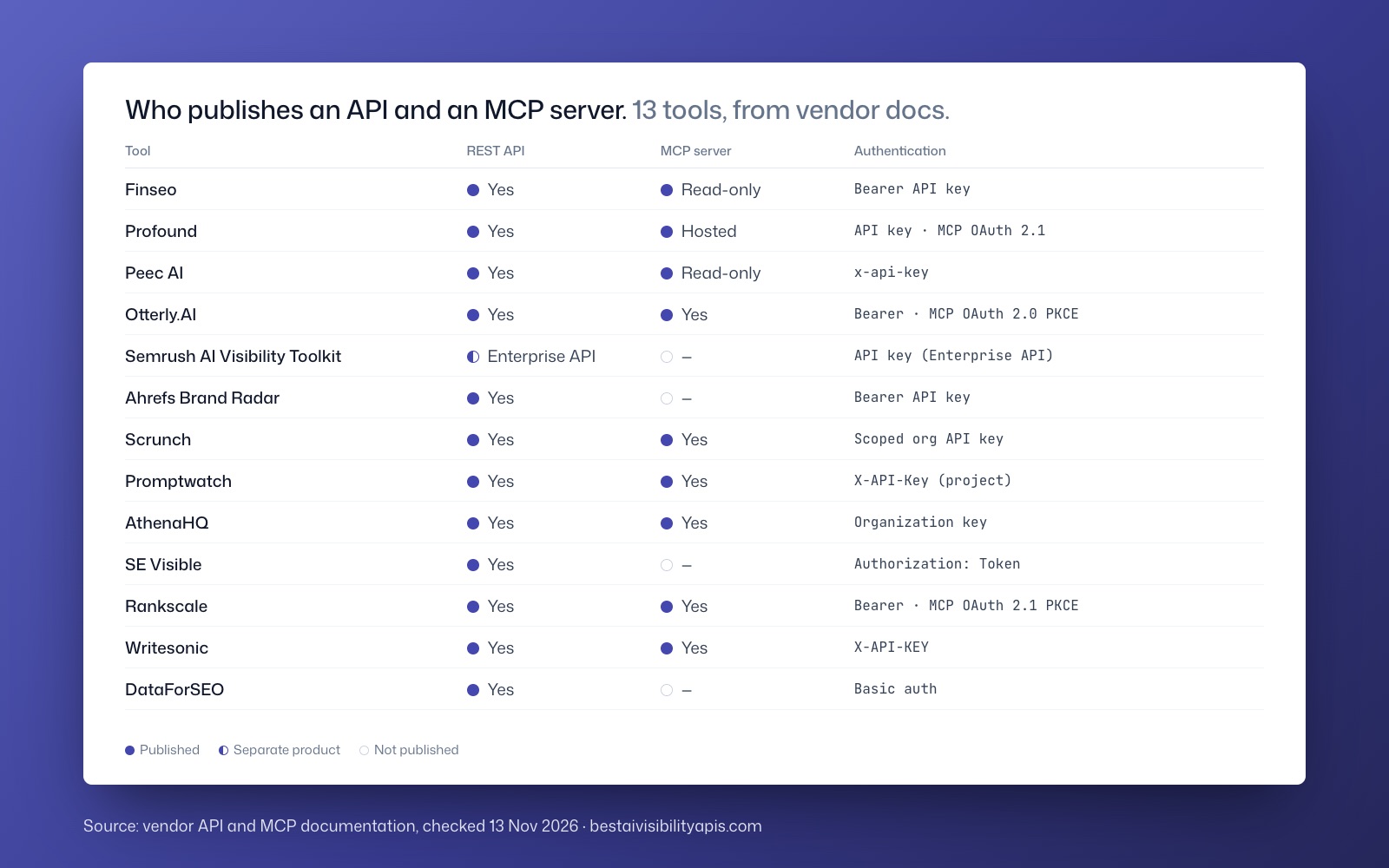
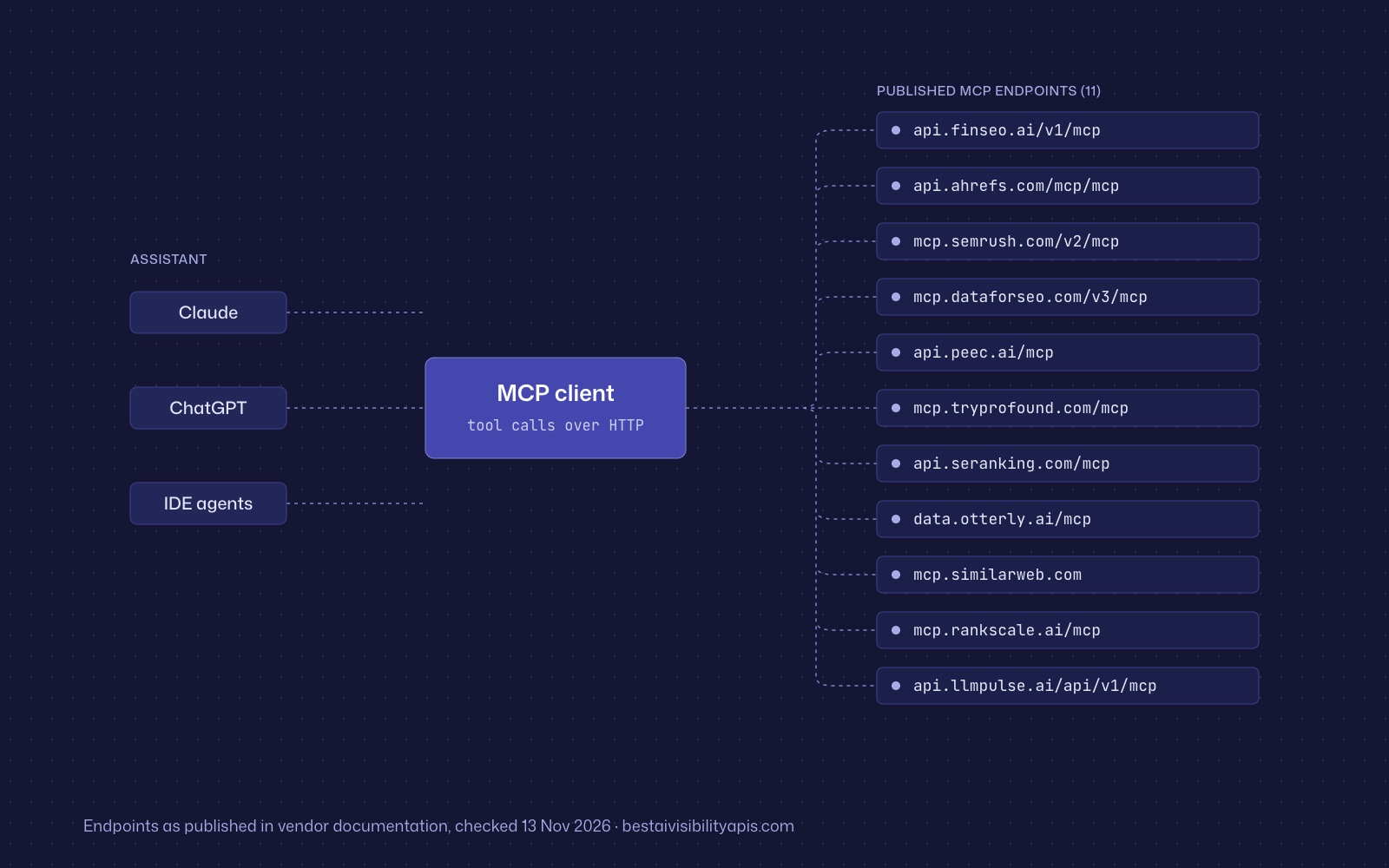
AI visibility APIs commonly use API keys in request headers, but the exact format, scope, and permissions vary by vendor.
Summarize with ChatGPTClaudePerplexity
View as Markdown
TL;DR
- AI visibility APIs use several credential formats, including `X-API-Key`, bearer, token, Basic authentication, and Semrush’s `Apikey` scheme; do not assume one universal header.[1]
- OAuth 2.1 with PKCE is documented for several MCP services, but MCP can also support API keys, personal access tokens, or Basic-auth alternatives depending on the deployment.[13][26]
- Project-scoped or selected-brand credentials provide stronger client isolation than broad organization or account credentials when agencies manage multiple customers.[23]
- MCP is not automatically read-only: Finseo documents read-only tools, while Peec and SE Visible document live write operations.[15]
- Store credentials outside prompts, browser code, and repositories, and replace any leaked secret immediately rather than relying on deleting its visible copy.[7][33]
AI visibility APIs commonly use API keys in request headers, but the exact format, scope, and permissions vary by vendor. MCP servers more often use OAuth, including OAuth 2.1 with PKCE, although several vendors also support bearer tokens or API-key alternatives.[1][2]
For agencies, the safest design is to isolate every client account, begin with read-only access, keep credentials outside prompts and repositories, and document how each credential expires, rotates, and gets revoked.
What authentication methods do AI visibility APIs use?
The main patterns are:
- Header API keys: Common formats include
X-API-Key,x-api-key,Authorization: Bearer,Authorization: Token, andAuthorization: Apikey.[1][3] - Basic authentication: DataForSEO uses an API login and password encoded in an HTTP Basic authorization header.[4]
- OAuth access tokens: Semrush supports OAuth 2.0 for its v4 API, while several MCP services document OAuth 2.0 or OAuth 2.1 flows.[5]
- Personal access tokens: Peec supports a user PAT for MCP, and Profound describes its API key as a personal access token.[6]
- Query-string credentials: Some legacy or fallback interfaces accept a key in the URL, but header-based authentication is preferable where supported because credentials in URLs can leak through logs, browser history, and monitoring systems.[7]
A Bearer header does not automatically mean OAuth. Finseo and LLM Pulse use bearer formatting for API keys, while OAuth bearer tokens are issued through an authorization flow and normally carry delegated permissions and an expiry.[8]
What does a header API-key request look like?
Use the exact header name required by the vendor. This generic example shows the pattern without exposing a real credential:
curl --request GET \
  --url https://api.example.com/v1/visibility \
  --header 'Authorization: Bearer YOUR_API_KEY_HERE' \
  --header 'Accept: application/json'
Finseo documents Authorization: Bearer <key>, Profound documents X-API-Key: <key>, Peec prefers x-api-key: <key>, and SE Visible documents Authorization: Token <key>.[9][10] Never substitute one format for another merely because both use an HTTP header.
How do Profound, Peec AI, Otterly, Scrunch, Ahrefs, and Semrush compare on API and MCP authentication?
The table reports what the vendors’ public documentation specifies. “Not published” means the cited documentation does not define a separate scope or permission model; it does not establish that the capability is unavailable.
| Tool | Auth method | Key scope: project, workspace, or account | Read-only or write | MCP auth |
|---|---|---|---|---|
| Finseo | Authorization: Bearer <key> API key |
Scoped by project, with read, write and export scopes; keys are stored SHA-256 hashed | read and export; write can create prompts, update tags, and manage projects |
OAuth 2.1 with PKCE for Claude and ChatGPT; API key for other clients; MCP tools are read-only.[10] For enterprise teams, Finseo offers SSO via SAML, roles per project, an audit trail and unlimited seats. It is hosted in Frankfurt, Germany with EU data residency, is GDPR-compliant with a data processing agreement (DPA), and is ISO 27001 certified, per its enterprise page. |
| Profound | X-API-Key: <key> personal access token |
Creating user and that user’s organization memberships | Read access documented; separate write scopes not published | OAuth 2.1 recommended, or long-lived bearer credential; literal OAuth scopes not published.[11][12] |
| Peec AI | Preferred x-api-key: <key>; query fallback also documented |
Company-wide organization access or one project | Separate read/write scopes not published for the API; MCP writes require organization-owner access | OAuth 2.0 or user PAT; MCP can create, edit, and delete configuration.[13] |
| Otterly.AI | Authorization: Bearer oai_live_... |
Granted workspaces and permissions | read is documented; broader guide references read and write |
OAuth 2.0 with PKCE and DCR; REST keys are not accepted for MCP.[14][1] |
| Scrunch | Authorization: Bearer <key> |
All brands or selected brands | Query and metrics are read functions; configure, create-brand, and optimize functions can write | OAuth; version not published; DCR supported.[15][12] |
| Promptwatch | X-API-Key: <key>; organization keys also require X-Project-Id |
One project or all projects in an organization | Retrieval and creation/update operations are documented; separate read/write scopes not published | OAuth or API key; API-key mode uses a bearer token.[16][14] |
| Rankscale | Preferred bearer API key; query fallback | Per-brand access inherited from the owning user | Keys have no scopes and inherit user read/write access | OAuth 2.1 with PKCE; mcp:read, mcp:write:content, and separate mcp:execute permission.[17] |
| SE Visible | Authorization: Token <key> or apikey query parameter |
Project-restricted model not published | Metrics and source retrieval plus project, brand, topic, and prompt management | OAuth 2.1 with DCR through SE Ranking MCP; API-key alternative.[9] |
| Ahrefs | Authorization: Bearer <key> |
Workspace | Separate read/write key taxonomy not published | OAuth; workspace-selected connection; raw MCP header not published.[18] |
| Semrush | v4 Authorization: Apikey <key> or OAuth bearer; legacy v3 query key |
Account key with independent permissions and TTL settings | v4 read-only allows GET; read/write allows GET, POST, PUT, PATCH, and DELETE | OAuth by default; API-key alternative; hosted MCP does not create or modify v3 Projects.[19] |
| DataForSEO | HTTP Basic with API login and password | API account | Separate read/write scopes not published | OAuth 2.0 by default for remote MCP; Basic fallback; local server uses environment credentials.[14][20] |
| LLM Pulse | Authorization: Bearer <key> |
Requests run as the key’s user; projects must belong to that user | read or read_write |
OAuth 2.1, PKCE-S256, and DCR; mcp:read is default and writable tools require mcp:write.[8] |
Are project-scoped keys safer than account-wide keys?
A project-scoped key limits the credential boundary itself. Promptwatch documents project keys associated with one project, while organization keys can access all projects and use X-Project-Id to select one.[21]
Peec supports company-wide or project-scoped API keys, and Scrunch can restrict keys to selected brands.[22][23] These are preferable for isolated client reporting because a compromised credential is less likely to expose unrelated accounts.
A project parameter alone is not equivalent to a project-scoped credential. If an organization-wide key can change the project identifier in a request, the real security boundary remains the organization-wide permission.
Profound uses a different model: access follows the key creator’s organization memberships. Removing the user from one organization removes access to that organization’s data, but the credential remains associated with its creator.[24] Agencies should therefore track both the key and its owner.
Do API keys normally support read-only and write permissions?
Some vendors document explicit permissions, but many do not publish a separate read/write key taxonomy. Finseo documents read, export, and write; Semrush v4 distinguishes read-only from read-and-write keys; and LLM Pulse requires read_write for write operations.[25][17]
Scrunch separates operations such as querying metrics, configuring data, creating brands, and optimizing content, while Rankscale separates reading, content changes, and credit-spending execution.[17] These granular models are more useful than treating every authenticated request as equally safe.
MCP access can also be writable. Finseo’s documented MCP toolset is read-only, but Peec documents tools that create, edit, and delete configuration, and SE Visible documents live project and prompt-management operations.[26][15]
How do MCP servers for AI visibility tools authenticate clients?
MCP authorization depends on the transport and server implementation. HTTP-based MCP deployments commonly use OAuth discovery, authorization codes, PKCE, access tokens, and resource binding; local stdio MCP implementations should retrieve credentials from the environment rather than assuming a browser OAuth flow.[2]
The MCP authorization specification has changed across revisions. The June 2025 revision recommended Dynamic Client Registration, the November 2025 revision made it optional behind other registration methods, and the July 2026 revision recommends Client ID Metadata Documents while allowing DCR for backward compatibility.[5]
MCP servers should also distinguish:
- The MCP resource: The server the client is trying to access.
- The authorization server: The system that authenticates the user and issues tokens.
- The audience or resource binding: The intended service for which the token was issued.
- The scopes: The operations or data the token permits.
A downstream API key should not be accepted as though it were an OAuth token issued for the MCP resource. MCP guidance requires the server to validate the token’s intended resource and reject unrelated tokens.[2]
How does OAuth 2.1 with PKCE work for MCP clients?
An MCP client begins by discovering the authorization server and generating a random code_verifier. It sends a derived S256 code challenge with the authorization request, along with the requested resource and scopes.[27]
After the user authenticates and approves access, the authorization server returns an authorization code to the registered redirect URI. The client exchanges that code for tokens by sending the original verifier; the server recalculates the challenge and issues tokens only when the values match.[8]
PKCE prevents an intercepted authorization code from being redeemed without the verifier held by the legitimate client. It does not, by itself, prove that every application, redirect configuration, scope decision, or authorization server is secure.[7]
OAuth 2.1 remains an Internet-Draft rather than a final RFC in the researched snapshot. Its draft consolidates safer defaults such as PKCE, exact redirect-URI matching, omission of the implicit grant, and omission of the password grant.[12]
How should agencies handle many client accounts?
A multi-client agency should treat authentication as an account-isolation problem, not merely a header-format problem.
- Create one credential boundary per client where practical. Prefer project keys or selected-brand restrictions for client-specific workflows.[22][26]
- Assign a named owner and offboarding responsibility. Record the owner, workspace or organization, projects, brands, expiry, permissions, and replacement contact.[1]
- Start with read-only access. Add configuration writes only after approval, and separate destructive operations or credit-spending execution where the vendor supports it.[9][28]
- Use the vendor’s intended authentication path. Do not send Otterly REST keys to its OAuth-only MCP, and do not build an unsupported Ahrefs hosted-MCP bridge.[26][29]
- Store secrets in a secret manager. Use environment variables or client-managed secret storage, not prompts, chat transcripts, shared documents, or source repositories.[30]
- Keep credentials out of browser code. Public browser applications cannot protect provisioned client secrets; use a backend or the vendor’s public-client OAuth flow instead.[12]
- Prefer headers over query strings. Keep legacy query-key integrations server-side, redact URLs, and prevent credentials from entering logs or analytics systems.
- Request the minimum scopes. Separate data reading, configuration changes, content changes, and paid execution instead of granting every available permission.[1][17]
- Validate every resource and operation. Authentication proves who made the request; authorization must still verify access to the specific client, project, object, and function.[2]
- Configure rate limits and recovery protections. Protect login, token, and recovery endpoints against brute-force and abuse attempts.[31]
- Enable secret scanning and push protection. GitHub can scan repository history and block supported credential patterns before they are pushed.[32]
- Document rotation and revocation. Record the exact provider procedure and test it before production onboarding.[7][21]
- Respond to leaks by replacing the credential first. GitHub says a leaked secret should be treated as compromised; deleting the string or repository does not invalidate it.[33]
- Investigate after replacement. Review provider and repository audit logs, remove remaining copies, and verify that the old credential is actually disabled.[33]
For agency governance, maintain a credential register with separate fields for scope, permissions, expiry, refresh behavior, revocation method, and last rotation. Published controls vary substantially: Rankscale documents one-hour MCP access tokens, Ahrefs permits key expiry from the current day to ten years, and LLM Pulse documents a one-year OAuth deadline with reusable refresh tokens.[8]
What authentication mistakes should agencies avoid with AI visibility tools?
The most common mistake is assuming that the word “OAuth” or “MCP” describes the complete security model. OAuth does not tell an agency which projects a user can access, and MCP does not guarantee read-only behavior.[34]
Other mistakes include:
- Treating a bearer-formatted API key as OAuth.[8][16]
- Using an organization key when a project key is available.[19][21]
- Supplying an API key in a query string without isolating and redacting it.[1][12]
- Placing credentials in prompts, source code, browser bundles, or shared notes.[12][30]
- Assuming a project ID restricts a credential that is actually account-wide.[12]
- Granting write or paid-execution permissions before validating the workflow.[35][15]
- Passing an MCP token through to another API without validating its audience and resource.[8][36]
- Assuming a deleted Git commit makes a leaked key safe.[33]
- Treating tool annotations such as read-only hints as a substitute for server-side authorization.[29][15]
Frequently asked questions
What is the safest authentication method for an AI visibility API?
There is no single safest method independent of the vendor’s implementation. A narrow project- or brand-scoped credential, stored in a server-side secret manager and limited to read operations, usually provides a smaller blast radius than an account-wide write key.
Does MCP always use OAuth 2.1?
No. Finseo, Otterly.AI, Rankscale, and LLM Pulse document OAuth-based MCP connections, but Promptwatch, Peec, SE Visible, and DataForSEO also document API-key or Basic-auth alternatives in particular configurations.[15]
Is a Bearer token the same as an OAuth token?
No. A bearer token describes how a credential is presented: whoever possesses it can generally use it. Finseo and LLM Pulse use bearer formatting for API keys, while OAuth bearer access tokens are issued through an authorization flow and normally have delegated scopes and a lifetime.[8]
Are AI visibility API keys project-scoped by default?
Not necessarily. Promptwatch explicitly supports project keys and organization keys, Peec supports company-wide or project-scoped keys, and Scrunch supports all-brand or selected-brand restrictions.[23]
What should an agency do if an API key appears in GitHub?
Treat the key as compromised, revoke or replace it immediately, and move the application to the replacement credential. GitHub warns that deleting the exposed string, adding a later commit, or deleting the repository does not prevent use of the original secret.[33]
Should MCP tools be granted write access?
Only when a documented business workflow requires it. Finseo’s MCP tools are read-only, while Peec, Promptwatch, Scrunch, Rankscale, and SE Visible document MCP operations that can change configuration or tracked data.[15]
How do Profound, Peec AI, and Otterly.AI authenticate MCP connections?
Profound recommends OAuth 2.1 for MCP or a long-lived bearer credential, and its API uses an `X-API-Key` personal access token.[11] Peec AI supports OAuth 2.0 or a user PAT for MCP, and its MCP can create, edit, and delete configuration.[13] Otterly.AI uses OAuth 2.0 with PKCE and DCR for MCP and does not accept REST keys there.[26]
How do Ahrefs and Semrush handle API and MCP authentication?
Ahrefs uses an `Authorization: Bearer` key scoped to a workspace, offers OAuth with a workspace-selected MCP connection, and permits key expiry from the current day to ten years.[28][1] Semrush v4 accepts an `Authorization: Apikey` key or an OAuth bearer token. Its read-only keys allow GET requests, and its hosted MCP uses OAuth by default but does not create or modify v3 Projects.[19]
Which AI visibility tools let agencies isolate client accounts?
Promptwatch supports project keys alongside organization keys, Peec AI supports company-wide or project-scoped keys, and Scrunch can restrict keys to selected brands.[23][28] Profound instead ties access to the key creator's organization memberships, so agencies should track both the key and its owner.[7]
Sources
- 1rankscale.airankscale.ai
- 2Authorizationmodelcontextprotocol.io
- 3Authenticationdocs.tryprofound.com
- 4Authentication – DataForSEO API v.3docs.dataforseo.com
- 5Authorizationmodelcontextprotocol.io
- 6Setup Guidedocs.peec.ai
- 7A Comprehensive Formal Security Analysis of OAuth 2.0publ.sec.uni-stuttgart.de
- 8OAuth 2.1 API reference - LLM Pulsellmpulse.ai
- 9SE Ranking MCP: Setup & Configurationseranking.com
- 10Finseo MCP Server: Claude, ChatGPT & Cursordocs.finseo.ai
- 11Authenticationdocs.tryprofound.com
- 12The OAuth 2.1 Authorization Frameworkietf.org
- 13MCP Serverdocs.peec.ai
- 14GitHub - dataforseo/mcp-server-typescript: DataForSEO API modelcontextprotocol server · GitHubgithub.com
- 15Toolspromptwatch.com
- 16Setuppromptwatch.com
- 17Rankscale MCP Server Docs | Rankscalerankscale.ai
- 18What is Ahrefs MCP | Ahrefs for Developersdocs.ahrefs.com
- 19Semrush MCP overview | Semrush APIdeveloper.semrush.com
- 20DataForSEO Model Context Protocol – DataForSEOdataforseo.com
- 21Getting Startedpromptwatch.com
- 22Provision an API keydevelopers.scrunch.com
- 23Authentication for Peec APIdocs.peec.ai
- 24Projects | Semrush APIdeveloper.semrush.com
- 25Authorization | Semrush APIdeveloper.semrush.com
- 26Llms Fulldocs.otterly.ai
- 27RFC 7636: Proof Key for Code Exchange by OAuth Public Clients | RFC Editorrfc-editor.org
- 28Connect your AI tool to the Scrunch MCPdevelopers.scrunch.com
- 29OtterlyAI MCP Serverdocs.otterly.ai
- 30Security Best Practicesdocs.tryprofound.com
- 31API2:2023 Broken Authentication - OWASP API Security Top 10api-security.owasp.org
- 32Push protectiondocs.github.com
- 33Remediating a leaked secret in your repositorydocs.github.com
- 34Semrush MCP | Semrush APIdeveloper.semrush.com
- 35MCP Server for AI Visibility Analytics | LLM Pulsellmpulse.ai
- 36Authorizationmodelcontextprotocol.io