Finseo publishes per-API-key limits of 60–600 requests per minute and 5,000–200,000 requests per day, depending on plan.
Summarize with ChatGPTClaudePerplexity
View as Markdown
TL;DR
- Finseo publishes per-API-key limits of 60–600 requests per minute and 5,000–200,000 requests per day, depending on plan.[2]
- Profound publishes a default allowance of 600 REST requests per hour per API key, while Promptwatch publishes shared organization-level REST and MCP buckets.[12][1]
- Peec publishes 1,000 MCP tool calls per minute per user, but its REST rate limit is not published in the cited documentation.[4]
- DataForSEO publishes a 10,000-requests-per-minute general ceiling while retaining endpoint-specific limits and application-level throttling errors.[14]
- A robust client must combine shared rate limiting, bounded exponential backoff, `Retry-After` parsing, safe batching, caching, pagination controls, and separate unit or billing-period budgets.[26][24]
Published limits vary substantially by vendor and endpoint. Finseo documents both per-minute and per-day API-key ceilings, Profound publishes an hourly request allowance, Promptwatch combines organization-wide REST and MCP buckets, and DataForSEO applies general and endpoint-specific limits.[1]
The safest implementation is to treat request rate, concurrency, prompt capacity, billing-period allowance, pagination, and API units as separate budgets. A request can be below its requests-per-minute ceiling while still exceeding a daily quota, unit balance, concurrency limit, or endpoint-specific allowance.
This reference reports only numerical limits published in vendor API documentation. “Not published” means the reviewed documentation does not state a number; it does not mean unlimited.
At-a-glance comparison
| Tool or API | Requests per minute | Requests per day | Unit or credit cost per call | Pagination limit | 429 / retry header |
|---|---|---|---|---|---|
| Finseo Creator | 60 per API key | 5,000 per API key | On request | 500 results for List Fan-outs | 429; Retry-After; X-RateLimit-* headers[2] |
| Finseo Business | 120 per API key | 25,000 per API key | On request | 500 results | 429; Retry-After; X-RateLimit-* headers[1][2] |
| Finseo Agency | 300 per API key | 100,000 per API key | On request | 500 results | 429; Retry-After; X-RateLimit-* headers[1][2] |
| Finseo Enterprise | 600 per API key | 200,000 per API key | On request | 500 results | 429; Retry-After; X-RateLimit-* headers[1][2] |
| Profound REST | Not published; 600 per hour by default | Not published | Not published | 50,000 rows | 429; Retry-After; X-RateLimit-* headers[1][3] |
| Peec AI REST | Not published | Not published | Not published | 10,000 for List Fanout Search Queries | REST retry contract not published[4] |
| Peec AI MCP | 1,000 tool calls per user | Not published | Not published | Tool-specific | Retry after a few seconds; exact headers not published[5] |
| Otterly.AI | Not published | Not published | Not published | Usually 100; endpoint-specific | 429 documented; retry headers not published[6] |
| Promptwatch REST and MCP | 150–834 per minute by plan, plus 1,000 per minute per IP | Not published | Not published | 100 for listed prompts and query fan-outs | 429; Retry-After; X-RateLimit-* headers[1][3] |
| Rankscale Metrics API | 200 per API key | Not published | Credit-spending tools consume credits; read tools do not | 500, or 50 with raw provider responses | 429; Retry-After; RateLimit-Policy[3] |
| SE Ranking Data API | 10 per second; trial default 1 per second | Not published | Not published | Not published | 429; retry headers not published[6][7] |
| SE Ranking Project API | 5 per second | Not published | Not published | Not published | 429; retry headers not published[7] |
| Ahrefs API v3 | 60 by default | Not published | Generally max(50, per-row cost × rows), with documented exceptions |
Endpoint-specific; plan row caps apply | 429; retry headers not published[6][8] |
| Semrush API | 10 per second | Not published | Report- and returned-line-specific | Up to 100,000 returned results for the cited report | 429; retry headers not published[6] |
| DataForSEO general API | 10,000 | Not published | Endpoint-specific; universal cost not published | Endpoint-specific | Application-level limit errors; retry header not published[9][5] |
Checked against official API documentation and product pages on 15 November 2026.
How should developers compare API limits?
Use these criteria rather than comparing only the largest requests-per-minute figure:
- Identity scope: determine whether the limit applies per API key, user, IP address, account, organization, or endpoint.
- Time windows: record every published second, minute, hour, day, rolling-window, and billing-period limit separately.
- Consumption model: distinguish HTTP requests from prompts, returned rows, API units, AI responses, and MCP tool calls.
- Concurrency: enforce simultaneous-request limits independently from request-rate limits.
- Pagination and batching: use the endpoint’s documented page and batch boundaries rather than product-wide assumptions.
- Failure signals: parse HTTP status, retry headers, response headers, and vendor-specific application error codes.
What does Finseo publish?
Finseo publishes four plan-level API ceilings, applied per API key. On brand plans, API & Webhooks are included from Growth (EUR 479 per month, about $528, or EUR 399, about $439, billed yearly), and the API is included in all agency packages. Creator allows 60 requests per minute and 5,000 per day; Business allows 120 per minute and 25,000 per day; Agency allows 300 per minute and 100,000 per day; Enterprise allows 600 per minute and 200,000 per day.[2] For enterprise teams, Finseo’s enterprise page lists SSO via SAML, roles per project, an audit trail and unlimited seats. Finseo is hosted in Frankfurt, Germany, with EU data residency, is GDPR-compliant with a data processing agreement (DPA), and is ISO 27001 certified.
Finseo’s API documentation says the API prompt limit follows the dashboard plan limit.[2][5] On the pricing page, Starter includes 50 tracked prompts, Business 150 and Growth 350, while Enterprise prompt volume is custom.
For the documented List Fan-outs endpoint, the default page size is 50 and the maximum is 500.[3][10] For background on what fan-outs are, Finseo’s own query fan-out study found that AI Mode rewrites one prompt into about nine synthetic searches. Finseo’s rate-limit response is HTTP 429 Too Many Requests with RATE_LIMIT_EXCEEDED; the documentation also specifies Retry-After, X-RateLimit-Limit, X-RateLimit-Remaining, and X-RateLimit-Reset headers.[2]
Which vendors publish hourly, organization-wide, or MCP limits?
Profound’s default REST allowance is 600 requests per hour per API key. Its documentation does not publish second-, minute-, or day-level ceilings in the cited references.[11] Profound REST reports support limit and offset, with a maximum of 50,000 rows per page.[12][13]
Promptwatch publishes plan-specific second, minute, and hourly limits. The published minute limits range from 150 on Explore, Solo, and Startup to 834 on Enterprise; hourly limits range from 100 to 50,000.[1] Promptwatch also applies a separate 1,000-request-per-minute-per-IP anti-abuse limit.[1][14]
Promptwatch’s authenticated REST and MCP traffic shares organization-level buckets across API keys and transports.[1] Creating another key therefore does not create another independent organization allowance.[5]
Peec publishes a 1,000-MCP-tool-call-per-minute-per-user limit.[15][4] Its REST request ceiling and REST retry headers are not published in the cited API references.[6][8]
Otterly documents MCP allowance usage separately and states that every MCP call except get_account_info counts against the plan’s MCP limit.[16] The numerical allowance varies by account and is exposed through account information, while a universal public requests-per-minute value is not published.[5]
How do prompts, units, credits, and requests differ?
These terms describe different resources:
- A request limit controls how often the client may call an API.
- A prompt quota limits tracked or submitted prompts.
- A unit balance charges for data returned or report execution.
- A credit allowance may apply to execution tools or AI-generated work.
- A billing-period allowance can stop calls until the next subscription period.
- A concurrency limit controls how many operations may run simultaneously.
Ahrefs generally calculates API consumption as max(50, per_row_cost × rows), although documented free and cached-request exceptions apply.[17] Ahrefs also publishes monthly API-and-integrations allowances of 200,000 units for Lite, 800,000 for Standard, and 2,000,000 for Advanced; Enterprise is custom.[18]
Ahrefs’ Brand Radar documentation says custom-prompt-only requests can be free, while requests that include Ahrefs prompt data use standard API pricing.[8] The API exposes headers including total calculated and actual unit cost, so usage reconciliation should use the actual-cost field where available.[19][17]
Semrush charges according to report type and returned data. For Domain Organic Search Keywords, the published prices are 10 units per live line and 50 units per historical line; Domain Paid Search Keywords costs 20 units per live line and 100 units per historical line.[20][19]
Rankscale distinguishes read-only MCP tools from execution tools: reading does not spend credits, while execution tools spend Rankscale credits and require confirmation.[21] Scrunch states that its API retrieval calls do not consume prompt quota; its charging model depends on collected AI responses.[22]
Why is DataForSEO endpoint-aware?
DataForSEO’s general documentation states a default ceiling of 10,000 requests per minute.[14][23] It separately documents 30 simultaneous requests for specified APIs and operation-specific ceilings such as 20 requests per minute for Tasks Ready, six for User Data, and 10 each for API Status and Errors.[14]
The reviewed DataForSEO documentation also contains endpoint-specific AI limits. Live LLM Mentions is documented at 2,000 calls per minute, with one task per call, while AI Keyword Data is documented at 2,000 calls per minute and 30 simultaneous requests.[14][23]
Because the general and endpoint-specific references do not present one universal AI limit, configure separate endpoint budgets rather than copying the 10,000-per-minute general ceiling everywhere.[5]
DataForSEO’s Standard method supports up to 100 tasks per request, but Live LLM Mentions permits one task per call.[14][23] Live LLM Mentions supports a page limit of 1,000 and an offset maximum of 9,000, with search_after_token available for deeper retrieval.[23]
DataForSEO commonly returns HTTP 200 with internal status fields. Error code 40202 indicates that the per-minute limit was exceeded, while 40209 indicates too many simultaneous queries.[9] A client that retries only HTTP 429 can therefore miss documented DataForSEO throttling signals.[24][5]
What pagination and batching limits matter?
Pagination is an endpoint contract, not a product-wide property. Examples include:
- Profound REST reports: up to 50,000 rows per page.[12]
- Peec List Fanout Search Queries: up to 10,000 records.[4]
- Promptwatch listed prompts and query fan-outs: page size up to 100.[3]
- Rankscale executions: up to 500 results, reduced to 50 when raw provider responses are requested.[3]
- Semrush Domain Organic Search Keywords: up to 100,000 returned results, even though the
display_limitparameter can reach 4,000,000.[20] - Otterly list operations: endpoint-specific pagination, commonly up to 100, with MCP cursors such as
nextCursorandhasMore.[16]
Peec documents bulk operations of up to 50 items for brands, prompts, tags, and topics, and up to 1,000 items for products and categories.[4] Otterly permits up to 1,000 prompt IDs when adding or removing prompts from a brand report.[25]
Batch only where the endpoint explicitly supports it. After a partial-success response, retain successful items and retry only eligible failures.
How should a client handle 429 responses and retry headers?
HTTP 429 Too Many Requests indicates that the client has sent too many requests within a server-defined period.[26] RFC 6585 says a response may include Retry-After; it does not require that header.[26]
Retry-After can contain either an integer number of seconds or an HTTP date, so clients must support both formats.[26] If both Retry-After and newer RateLimit fields are present, the IETF draft says Retry-After takes precedence.[26]
Use this retry sequence:
- Classify the failure from HTTP status, response body, headers, and vendor-specific error codes.
- Stop immediately for exhausted billing-period allowances, zero unit balance, invalid requests, and non-idempotent operations without an idempotency guarantee.
- If
Retry-Afteris valid, wait at least that long. - Otherwise use a documented reset timestamp or a bounded exponential delay.
- Add random jitter to prevent multiple workers retrying together.
- Limit attempts and total elapsed time.
- Retry only safe or idempotent reads unless the vendor documents safe replay.
- Reconcile actual units, rows, and partial batch outcomes before submitting more work.
- Cache reusable successful responses under a defined freshness policy.
- Never cache a
429response; RFC 6585 says it must not be stored by a cache.[5][26]
A short Python pattern can implement the transport portion:
import random
import time
from email.utils import parsedate_to_datetime
from datetime import datetime, timezone

import requests


def retry_after_seconds(value):
    if not value:
        return None

    try:
        return max(0.0, float(value))
    except ValueError:
        try:
            retry_at = parsedate_to_datetime(value)
            if retry_at.tzinfo is None:
                retry_at = retry_at.replace(tzinfo=timezone.utc)
            return max(0.0, (retry_at - datetime.now(timezone.utc)).total_seconds())
        except (TypeError, ValueError, OverflowError):
            return None


def get_with_backoff(url, headers=None, attempts=5, base=1.0, cap=30.0):
    for attempt in range(attempts):
        response = requests.get(url, headers=headers, timeout=30)

        if response.status_code < 400:
            return response

        retryable = response.status_code in {408, 425, 429, 500, 502, 503, 504}
        if not retryable or attempt == attempts - 1:
            response.raise_for_status()

        server_delay = retry_after_seconds(response.headers.get("Retry-After"))
        delay = server_delay if server_delay is not None else min(cap, base * 2**attempt)
        time.sleep(delay + random.uniform(0, min(1.0, delay / 4)))

    raise RuntimeError("retry budget exhausted")
This code handles transport retries only. Production clients should add a shared limiter, endpoint-specific concurrency control, unit accounting, billing-period detection, application-level error parsing, and idempotency safeguards.
Why can MCP tool calls count against the same quota?
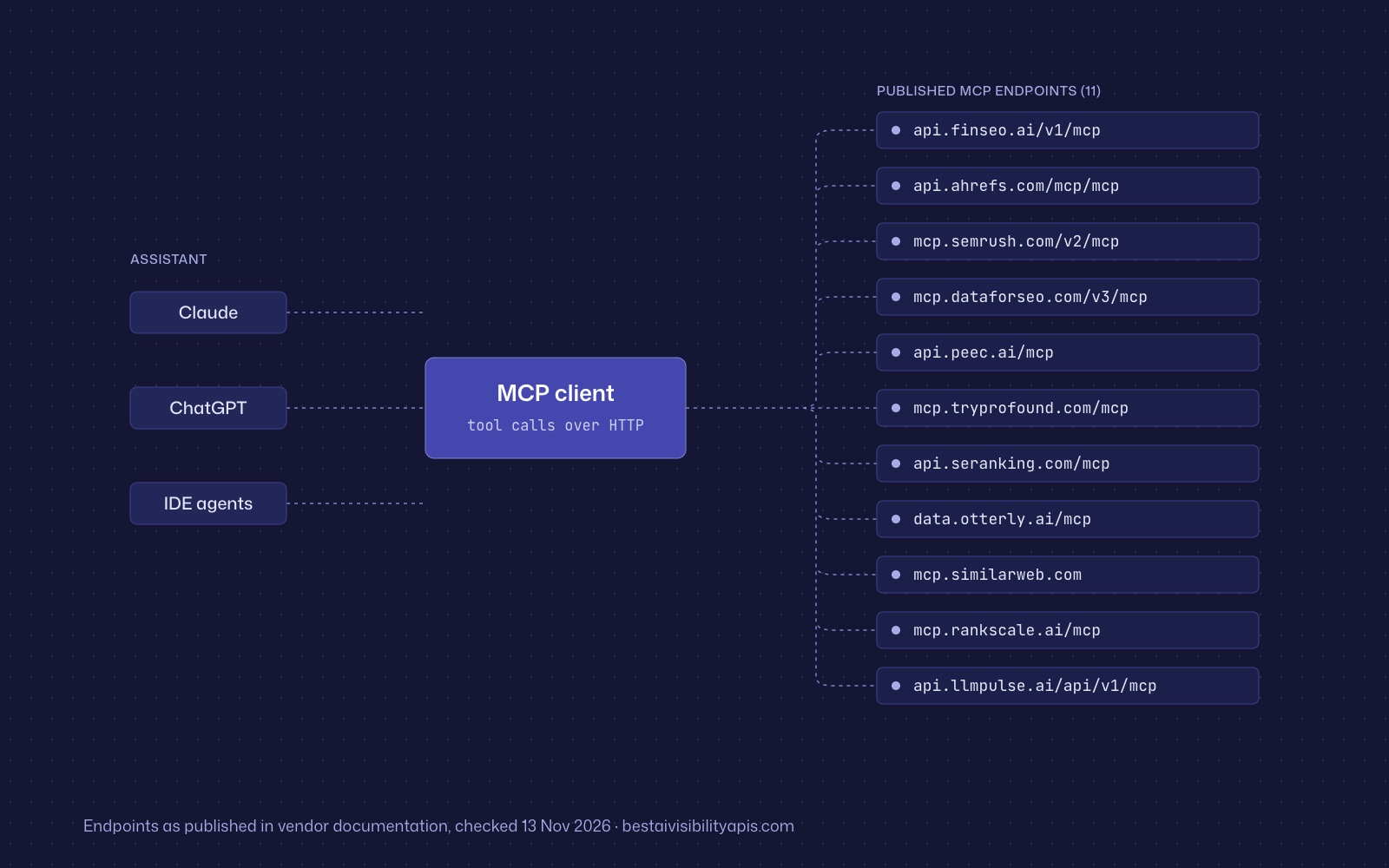
MCP defines a tool interface, not a universal free-access allowance. The protocol requires servers to rate-limit tool invocations, while page size and cursor behavior remain server-controlled.[27][3]
Vendors then choose their own accounting model. Promptwatch explicitly shares REST and MCP request buckets at the organization level; Ahrefs applies the same API-and-integrations unit system to direct API, MCP, and Ahrefs Connect; Semrush says MCP uses the same unit-based system as its API.[28]
Other vendors differ. Peec publishes a separate MCP call limit, Otterly counts most MCP calls against an MCP allowance, and Rankscale distinguishes free reading tools from credit-consuming execution tools.[16] Therefore, an MCP client should read the vendor’s accounting documentation and use the same shared limiter whenever the vendor says transports share a bucket.
Frequently asked questions
What is the typical AI visibility API rate limit?
There is no single typical limit. Published examples range from 60 requests per minute on Finseo Creator to 10,000 requests per minute for DataForSEO’s general API, while Profound publishes 600 requests per hour and SE Ranking publishes per-second limits.[2][1] These figures have different scopes and should not be compared without checking endpoint, identity, and time window.
Does an MCP server have a separate rate limit?
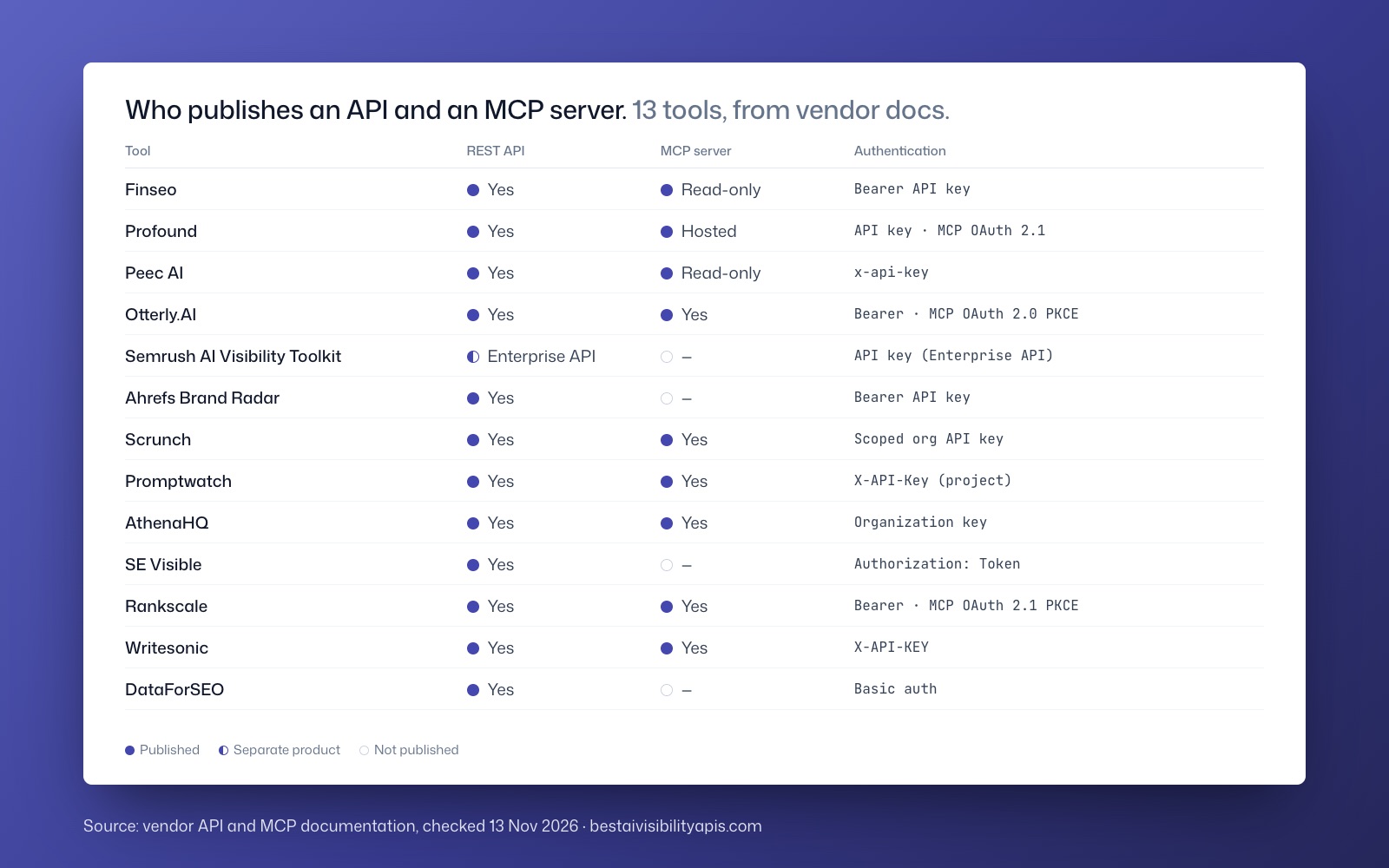
Sometimes. Peec publishes 1,000 MCP tool calls per minute per user, while Promptwatch applies the same organization-level second, minute, and hourly buckets to REST and MCP.[1] Otterly documents MCP allowance usage separately, and Ahrefs and Semrush tie MCP to their API unit systems.[29]
Do AI visibility APIs publish daily quotas?
Some do, but many do not. Finseo publishes daily API-key ceilings from 5,000 to 200,000 depending on plan, while Profound, Promptwatch, Peec, Ahrefs, and Semrush do not publish a comparable daily request ceiling in the cited documentation.[5] An unpublished daily limit should be treated as unknown rather than unlimited.
Does every 429 response include Retry-After?
No. RFC 6585 says a `429` response may include `Retry-After`, not that it must.[26] Finseo and Profound document the header, Promptwatch documents it with its rate-limit headers, and several other vendors leave retry-header behavior unpublished.[5]
How should DataForSEO rate limits be configured?
Use a general 10,000-requests-per-minute budget only where the endpoint documentation permits it.[11][8] Maintain separate endpoint budgets for documented AI limits, simultaneous-request ceilings, Tasks Ready polling, and application-level errors such as `40202` and `40209`.[14][9]
Can pagination limits increase API costs?
Yes. Ahrefs charges according to returned rows and selected fields, while Semrush prices several reports per returned line and changes the price between live and historical data.[19] Larger pages can reduce HTTP request count but increase unit consumption, so pagination should be optimized against both traffic and spend budgets.
Sources
- 1Rate Limitspromptwatch.com
- 2Finseo API Rate Limitsdocs.finseo.ai
- 3rankscale.airankscale.ai
- 4Tools Referencedocs.peec.ai
- 5Llms Fulldevelopers.scrunch.com
- 6Publishdevelopers.scrunch.com
- 7API rate limits - SE Ranking API Documentationseranking.com
- 8AI Responses | Ahrefs for Developersdocs.ahrefs.com
- 9appendix/errors – DataForSEO API v.3docs.dataforseo.com
- 10List Fan-outsdocs.finseo.ai
- 11Scrunch AI: Early-Access Query API Documentation | Scrunch Help Centerhelpcenter.scrunchai.com
- 12Conventions & gotchasdocs.tryprofound.com
- 13Query Citationsdocs.tryprofound.com
- 14Rate Limits and Request Limits for DataForSEO API – DataForSEOdataforseo.com
- 15List Fanout Search Queriesdocs.peec.ai
- 16Llms Fulldocs.otterly.ai
- 17Limits consumption | Ahrefs for Developersdocs.ahrefs.com
- 18About API v3 | Help Center - Ahrefshelp.ahrefs.com
- 19Overview | Semrush APIdeveloper.semrush.com
- 20Domain reports | Semrush APIdeveloper.semrush.com
- 21Rankscale MCP Server Docs | Rankscalerankscale.ai
- 22Scrunch API FAQs (Query API & Responses API) | Scrunch Help Centerhelpcenter.scrunchai.com
- 23aioptimization/llmmentions/search/live – DataForSEO API v.3docs.dataforseo.com
- 24Timeouts, retries and backoff with jitteraws.amazon.com
- 25OtterlyAI MCP Serverdocs.otterly.ai
- 26draft-ietf-httpapi-ratelimit-headers-11 - RateLimit header fields for HTTPdatatracker.ietf.org
- 27RFC 9110: HTTP Semanticsrfc-editor.org
- 28Semrush MCP | Semrush APIdeveloper.semrush.com
- 29What is Ahrefs MCP | Ahrefs for Developersdocs.ahrefs.com